Adjustable Ergonomic Swivel Office Chair: Back + Arm Support
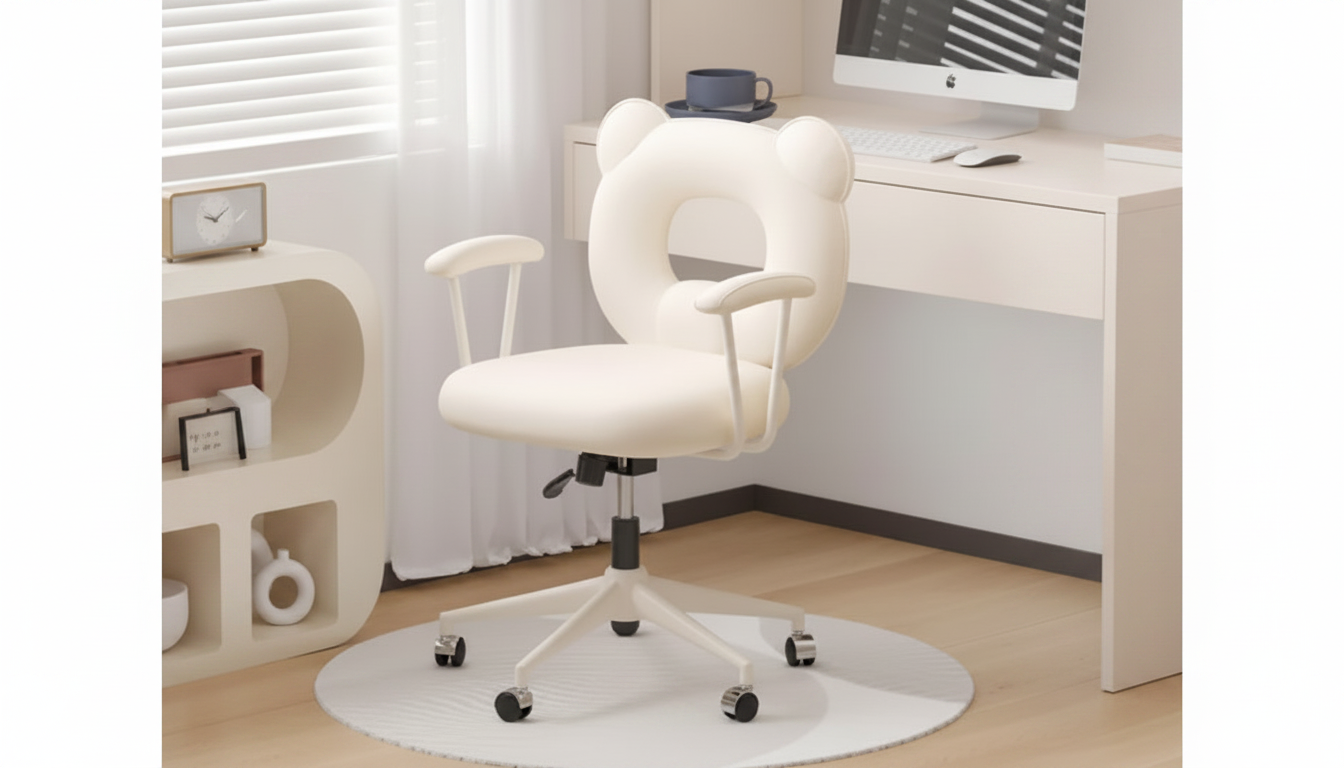
Adjustable Ergonomic Swivel Office Chair with Backrest & Armrests
A comfortable office setup starts with a chair that supports natural posture, moves smoothly with the body, and adjusts to different tasks throughout the day. An adjustable ergonomic swivel chair with a supportive backrest and armrests helps work sessions feel steadier, lighter, and less fatiguing—whether you’re typing for hours, hopping on video calls, or rotating between screens and paperwork.
What makes an ergonomic swivel chair feel better day to day
Ergonomics isn’t about sitting perfectly still; it’s about fitting the chair to your body and letting posture shift naturally as you work. A well-designed swivel chair can improve comfort in several practical ways.
- Supports a neutral seated posture by encouraging the spine’s natural curves.
- Reduces “static sitting” by allowing small movements and repositioning throughout the day.
- Helps distribute pressure more evenly across hips and thighs with a stable seat.
- Keeps shoulders more relaxed when armrests are set to the right height.
- Improves reach and workflow with swivel access to desk surfaces, drawers, and monitors.
For general workstation guidance, these resources are useful references: OSHA’s Computer Workstations eTool and Mayo Clinic’s office ergonomics guide.
Adjustability features to look for (and how to set them)
Even a supportive chair won’t feel right until it’s adjusted to your desk height, your body, and the way you actually work. Use this quick sequence when dialing in fit:
- Seat height: set so feet rest flat and knees stay roughly level with hips.
- Backrest support: adjust so the lower back feels supported without forcing an exaggerated arch.
- Armrests: raise or lower so forearms can rest lightly while shoulders remain down and relaxed.
- Swivel range and base stability: ensure the chair turns smoothly without wobble during reach.
- Daily reset tip: re-check settings after changing footwear, desk height, or monitor position.
Small changes add up. A seat that’s half an inch too high can push you toward toe-pointing; armrests that sit a touch too high can create shoulder tension you might not notice until late afternoon.
Backrest + armrests: comfort details that matter during long sessions
Back support and arm support work together. When the backrest carries part of the upper-body load and the armrests catch the weight of your forearms, the neck and shoulders often feel less “held up” by effort.
- Backrest support helps reduce slouching, especially during typing and video calls.
- Armrests can reduce load on neck and upper back when positioned correctly.
- A supportive backrest encourages micro-movements and posture changes rather than rigid sitting.
- For focused work: keep armrests slightly below desk level to prevent shoulder shrugging.
- For reading or calls: a slightly more relaxed back position can reduce spinal compression.
If you tend to perch forward when concentrating, try pulling yourself fully back so your lower back makes contact with the backrest before starting a long typing block. This simple reset can make the chair feel “new” again.
Swivel performance for multi-task workspaces
A swivel chair earns its place when your desk has multiple zones: keyboard and mouse in front, notes to one side, a filing drawer or printer nearby, and maybe a second monitor angled off-center. Swivel lets the chair move with you, reducing the need to twist through the spine.
- Swivel makes it easier to move between keyboard, mouse, notebook, and secondary surfaces.
- Turning from the hips with the chair (instead of twisting the spine) can feel more comfortable.
- Pairs well with L-shaped desks, shared tables, and compact home-office corners.
- A smooth swivel helps reduce repetitive reaching and awkward torso rotations.
- Consider floor type: use a chair mat on delicate flooring to preserve glide and reduce noise.
Fit guide: matching chair setup to body size and desk height
Think of comfort as a chain: feet, hips, back, shoulders, then hands. If the lower body isn’t grounded, the upper body tends to compensate.
Quick setup checklist for a comfortable seated position
| Adjustment | Target position | Common sign it needs changing |
|---|---|---|
| Seat height | Feet flat; knees comfortable and not sharply raised | Feet dangling or knees pushed up high |
| Backrest support | Lower back feels supported; torso upright without strain | Slouching, rounded shoulders, lower-back fatigue |
| Armrest height | Forearms lightly supported; shoulders relaxed | Shoulders creeping upward or wrists pressing into desk edge |
| Desk/keyboard reach | Hands reach keys without leaning forward | Neck craning and chest collapsing toward the desk |
Materials, durability, and maintenance expectations
Assembly and placement tips for a smoother setup
Who this chair setup suits best
Product highlights and buying considerations
- Adjustable Ergonomic Swivel Office Chair with Backrest & Armrests
- Luxury Modern Minimalist Sideboard with Transparent Doors and High-Temperature Resistant Countertop (helpful for keeping supplies within swivel reach)
- Quirky Kawaii Puppy Minimalist Nightstand (a compact landing spot for notebooks, chargers, or a headset)
FAQ
How should the armrests be positioned for typing?
Set armrests so your forearms can rest lightly while your shoulders stay relaxed and down. If you feel your shoulders rising or your elbows being pushed outward, lower or narrow the support position so your arms can hang naturally.
Is a swivel chair better than a stationary chair for desk work?
A swivel chair can feel better for many desk setups because it helps you rotate toward different work areas without repeatedly twisting your torso. The advantage is strongest when the base feels stable and the swivel action stays smooth during reach.
What is the quickest way to adjust an office chair for better posture?
Start with seat height so your feet are flat and your lower body feels grounded. Next, set the backrest so your lower back is supported, then adjust armrests until your shoulders remain relaxed while your forearms are lightly supported.








Leave a comment